_%E7%88%B1%E7%BB%99%E7%BD%91_aigei_com.gif)
_%E7%88%B1%E7%BB%99%E7%BD%91_aigei_com.gif)
M-lag配置(H3C模拟器)
1.实验环境
(H3C模拟器V5.10.3)
2.拓扑
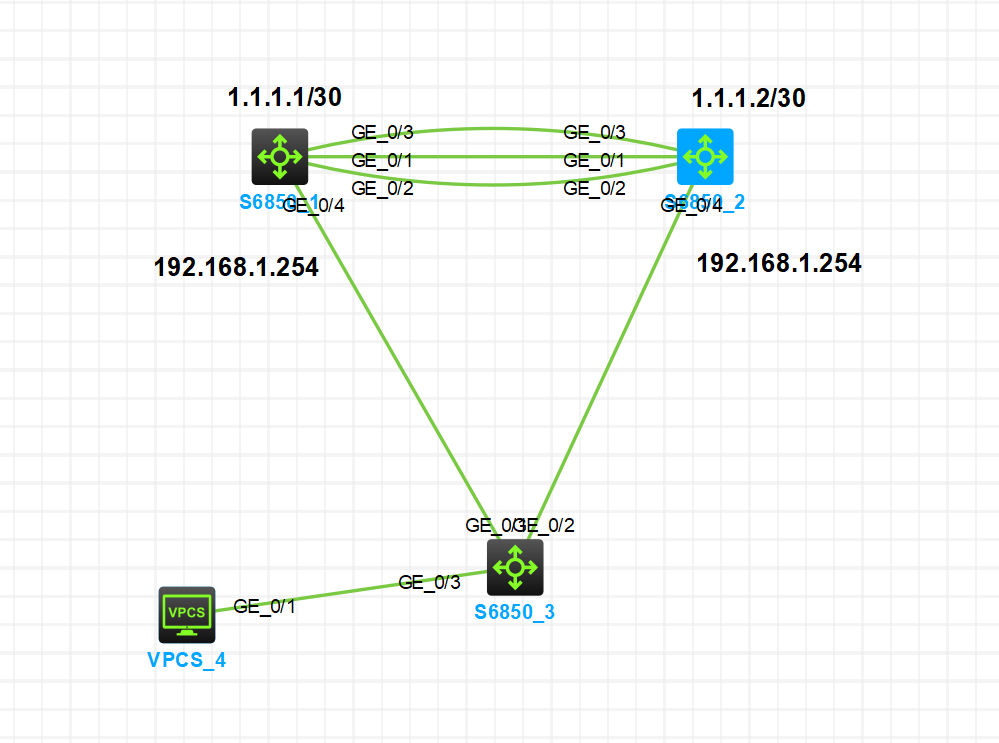
1. Keepalive链路(心跳通道):
   SW1(G1/0/1,IP:1.1.1.1/30,绑定VRF m-lag_keepalive)↔ SW2(G1/0/1,IP:1.1.1.2/30,绑定VRF m-lag_keepalive)

2. Peer-link链路(设备互联+状态同步):
   SW1(G1/0/2、G1/0/3)↔ SW2(G1/0/2、G1/0/3),聚合为BAGG100(MLAG Peer-link组)

3. 业务链路(跨设备聚合):
   SW1(G1/0/4)、SW2(G1/0/4)↔ SW3(G1/0/1、G1/0/2),聚合为BAGG101(业务聚合组)

4. 终端与网关:
   SW3(G1/0/3)↔ VPCS(IP:192.168.1.1/24,网关:192.168.1.254);SW1/SW2的VLAN 10接口配置网关IP 192.168.1.254,统一MAC:0001-0001-0002
3.实验需求
实现SW1与SW2的MLAG双活架构,完成设备间Peer-link互联、Keepalive心跳检测、跨设备业务链路聚合,确保终端(VPCS)通过双活网关正常通信,同时实现链路冗余。
核心设备:SW1(MLAG成员1)、SW2(MLAG成员2)、SW3(业务接入交换机)、VPCS(终端,VLAN 10)
4.配置步骤
4.1.配置SW1和SW2的G1/0/1接口配置为三层接口
(由于实际网络中存在多个M-lag双活网关,且keepalive只在本链路上工作,在不考虑keepalive链路中间有其他三层设备时,推荐使用VRF对keepalive链路进行隔离)
[SW1]
ip vpn-instance m-lag_keepalive
int G1/0/1
port link-mode route
ip binding  vpn-instance m-lag_keepalive #创建VRF,隔离Keepalive流量(避免与业务冲突)
ip address 1.1.1.1 30
[SW2]
ip vpn-instance m-lag_keepalive
int G1/0/1
port link-mode route
ip binding  vpn-instance m-lag_keepalive
ip address 1.1.1.2 30
4.2.配置SW1和SW2的G1/0/1和G1/0/2接口配置为二层聚合接口
[SW1]
interface Bridge-Aggregation100
link-aggregation mode dynamic
interface  range GigabitEthernet1/0/2 to  GigabitEthernet1/0/3
port link-aggregation group  100
[SW2]
(同SW1)
4.3.配置 SW1 和 SW2 形成 M-LAG 系统
[SW1]
 m-lag system-mac 0001-0001-0001 #双活网关统一MAC,终端ARP表需一致
 m-lag system-number 1 # MLAG成员编号,SW1=1、SW2=2,必须唯一
 m-lag system-priority 4096
 m-lag keepalive ip destination 1.1.1.2 source 1.1.1.1 vpn-instance m-lag_keepalive
 m-lag mad exclude interface g1/0/1 # 排除MAD检测,防止心跳链路波动误判分裂
interface  Bridge-Aggregation  100
port  m-lag peer-link 1 #标记为Peer-link,用于SW1/SW2状态同步
[SW2]
 (仅列差异,其余同SW1)
 m-lag system-number 2
 m-lag keepalive ip destination 1.1.1.1 source 1.1.1.2 vpn-instance m-lag_keepalive
验证
[SW2]dis m-lag  summary
Flags: A -- Aggregate interface down, B -- No peer M-LAG interface configured
       C -- Configuration consistency check failed

Peer-link interface: BAGG100
Peer-link interface state (cause): UP
Keepalive link state (cause): UP
#########
[SW2]dis m-lag  keepalive
Neighbor keepalive link status (cause): Up
Neighbor is alive for: 199 s 960 ms
Keepalive packet transmission status:
  Sent: Successful
  Received: Successful
Last received keepalive packet information:
  Source IP address: 1.1.1.1
  Time: 2025/11/09 13:34:29
  Action: Accept

M-LAG keepalive parameters:
Destination IP address: 1.1.1.1
Source IP address: 1.1.1.2
Keepalive UDP port : 6400
Keepalive VPN name : m-alg_keepalive
Keepalive interval : 1000 ms
Keepalive timeout  : 5 sec
Keepalive hold time: 3 sec
4.4.配置SW1和SW2的下连SW3接口为M-lag接口
[SW1]
m-lag consistency-check disable # 【模拟器特殊】仅因模拟器Bug关闭,生产需先解决配置差异再开启
interface Bridge-Aggregation101
link-aggregation mode dynamic
interface  range GigabitEthernet1/0/4
port link-aggregation group  101
interface Bridge-Aggregation101
port m-lag group 101
undo mac-address static source-check enable#关闭静态MAC的源检查功能,模拟器不支持
[SW2]
(同SW1)
4.5.配置SW3的聚合接口
[SW3]
interface Bridge-Aggregation101
link-aggregation mode dynamic
interface  range GigabitEthernet1/0/1 to GigabitEthernet1/0/2
port link-aggregation group  101
验证
[SW3]dis link-aggregation summary
Aggregation Interface Type:
BAGG -- Bridge-Aggregation, BLAGG -- Blade-Aggregation, RAGG -- Route-Aggregation, SCH-B -- Schannel-Bundle
Aggregation Mode: S -- Static, D -- Dynamic
Loadsharing Type: Shar -- Loadsharing, NonS -- Non-Loadsharing
Actor System ID: 0x8000, 3488-af6b-0300

AGG        AGG   Partner ID              Selected  Unselected  Individual  Share
Interface  Mode                          Ports     Ports       Ports       Type
--------------------------------------------------------------------------------
BAGG101    D     0x1000, 0001-0001-0001  2         0           0           Shar
4.6.SW1和SW2配置VLAN和双活网关
[SW1]
vlan 10
interface Bridge-Aggregation101
 port link-type trunk
 port trunk permit vlan 10
undo port trunk  permit vlan  1
interface Vlan-interface10
 ip address 192.168.1.254 255.255.255.0
 mac-address 0001-0001-0002
[SW2]
(同SW1)
4.7.SW3配置VLAN和接口类型
[SW3]
vlan 10
interface Bridge-Aggregation101
 port link-type trunk
 port trunk permit vlan 10
undo port trunk  permit vlan  1
interface GigabitEthernet1/0/3
 port link-type access
 port access vlan 10
最后的测试
VPCS_4> ping 192.168.1.254
84 bytes from 192.168.1.254 icmp_seq=1 ttl=255 time=2.461 ms
84 bytes from 192.168.1.254 icmp_seq=2 ttl=255 time=2.037 ms
84 bytes from 192.168.1.254 icmp_seq=3 ttl=255 time=2.065 ms
84 bytes from 192.168.1.254 icmp_seq=4 ttl=255 time=2.103 ms
84 bytes from 192.168.1.254 icmp_seq=5 ttl=255 time=1.974 ms

VPCS_4>